Google Maps for Your Code: Rescuing Architecture with the C4 Model
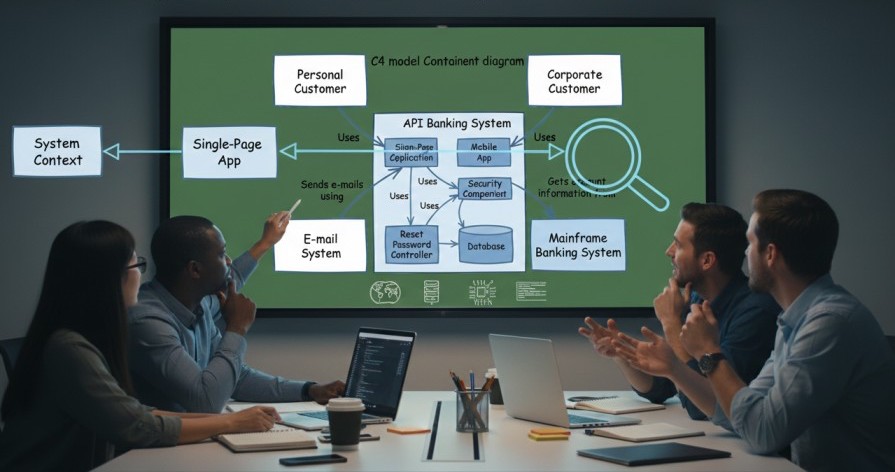
Imagine you’ve just joined a high-stakes project as the new Lead Architect. Your first task? Understand the existing "Legacy Titan" system before the next major migration.
You ask for documentation. Someone hands you a PDF from 2021. It’s a single, sprawling diagram that looks like a bowl of spaghetti exploded on a whiteboard. There are boxes with names like "Service A," arrows pointing in every direction without labels, and a mysterious yellow circle in the corner that no one can explain.
Half of the developers say "Service A" handles payments; the other half says it was replaced by "The Gateway" last year. You’re playing a high-stakes game of Architecture Telephone, and every minute spent guessing is a minute closer to a failed migration.
This is the exact problem Simon Brown set out to solve when he created the C4 Model.
The Problem: Why Traditional Diagrams Fail
Software architecture diagrams often suffer from three fatal flaws:
- Ambiguous Notation: Is that box a class? A server? A whole department?
- Mixed Abstractions: Putting a Java class next to a cloud region is like putting a picture of a spark plug next to a map of the United States.
- The "Out-of-Date" Trap: Because they are hard to draw and harder to read, they are rarely updated.
The Solution: A Zoomable Map for Your System
The C4 model treats your software like Google Maps. When you look at a map of the world, you don't see street signs in London. You only see continents. As you zoom in, you see countries, then cities, then streets.
C4 provides a structured way to zoom into your software using four levels of abstraction, each with a clear purpose and audience. Let’s walk through them using a hypothetical "Online Banking System".
The 4 Levels of C4
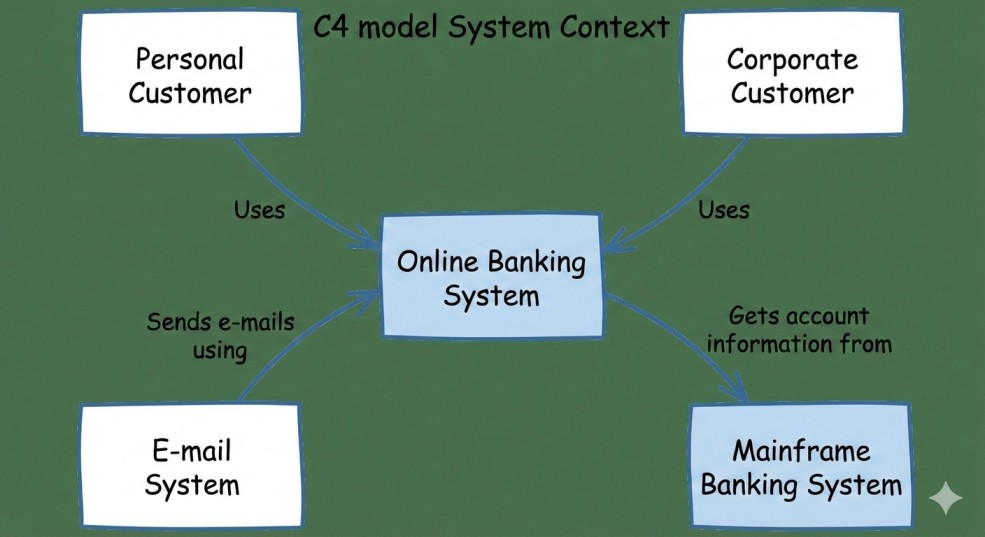
Level 1: System Context Diagram
This is the "10,000-foot view." It shows your system as a single box in the center, surrounded by the people who use it and the other systems it interacts with.
- Audience: Everyone (Stakeholders, PMs, Devs).
- Goal: Show what the system does and how it fits into the world.
- Rule: No technology talk here. Focus on users and high-level flows.
Example: The Online Banking System, its customers, the bank staff, and external systems like credit bureaus or payment gateways.
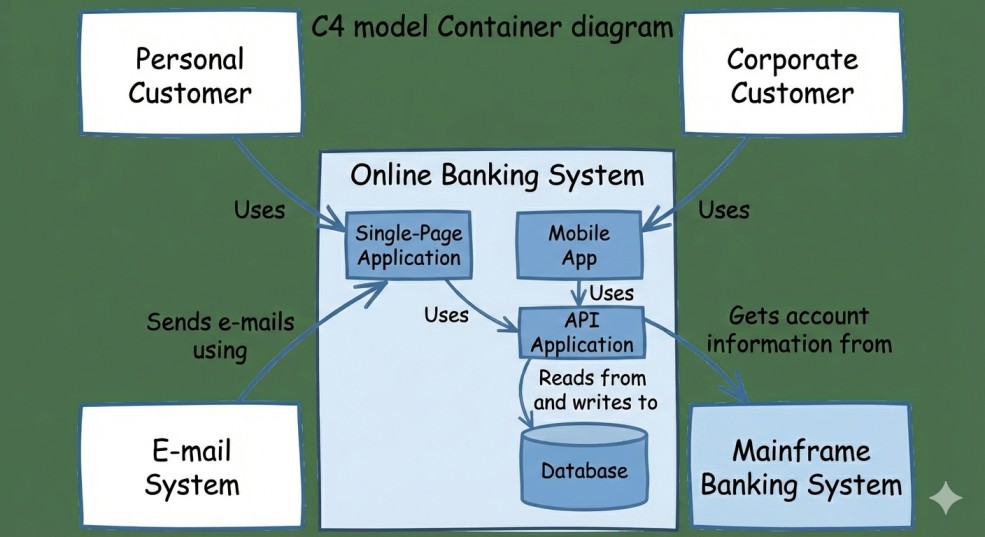
Level 2: Container Diagram
Zoom in one level. A "Container" in C4 isn't necessarily a Docker container—it’s a separately deployable unit. This could be a Single Page App (SPA), a mobile app, a database, or a microservice.
- Audience: Technical people (Devs, Architects, Ops).
- Goal: Show the high-level shape of the architecture and the technology choices.
Example: For the Online Banking System: a Web App, Mobile App, API Application, and a Database, plus how they talk to each other and to external systems.
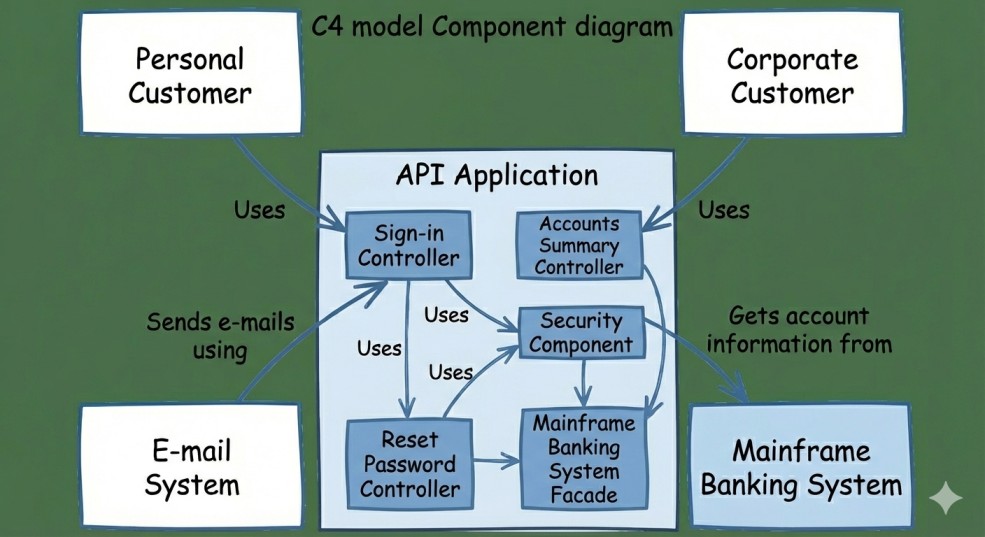
Level 3: Component Diagram
Now zoom inside a specific container. Here we see the internal components—logical groupings of functionality like a "Payment Controller" or an "Email Service".
- Audience: Developers working on that specific container.
- Goal: Understand how a container is structured internally.
Example: Inside the API Application, you might have components for Authentication, Payments, Notifications, and Reporting.
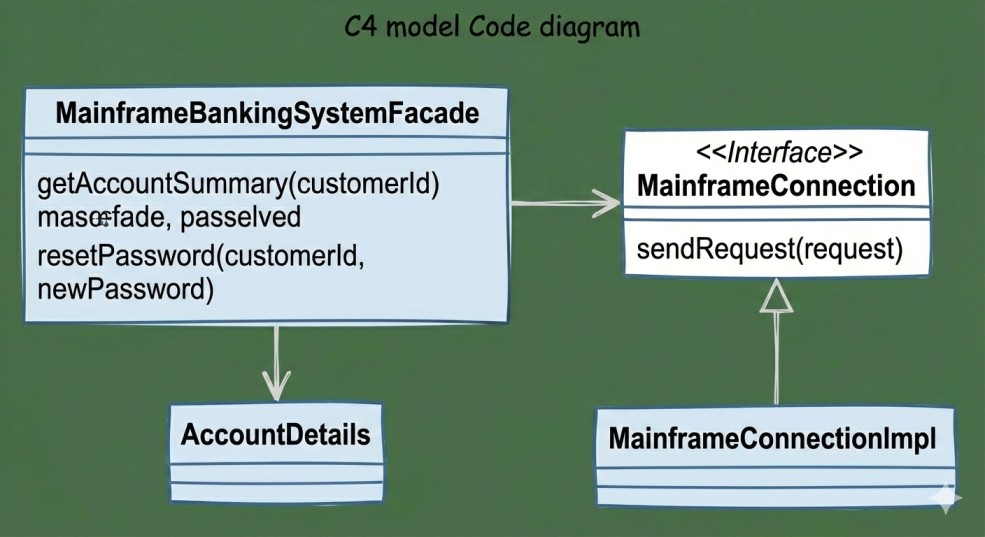
Level 4: Code Diagram
This is the deepest level of zoom. It’s essentially a UML class diagram or similarly detailed view of the implementation.
Note: Most architects skip this level or auto-generate it. Code changes too fast for manual Level 4 diagrams to stay useful, so invest here only when it serves a real purpose (e.g., onboarding or critical refactors).
How to Get Started: A 3-Step Guide
If you’re ready to bring clarity to your team, don't try to document everything at once.
- Start with Level 1 (Context): Spend 30 minutes at a whiteboard. Identify every user and every external API your system touches. If you can’t agree on this, you have a bigger problem than just diagrams!
- Define your Containers: Map out the big pieces. What is running where? What talks to what? This is one of the most valuable diagrams you will ever own.
- Choose Your Tooling:
- Low Friction: Use a tool like Excalidraw or Lucidchart.
- Diagrams as Code: Use Mermaid.js or Structurizr so you can version your architecture alongside your code and keep it fresh.
Final Thoughts
The C4 model isn't about being "right" or following rigid rules. It’s about shared understanding. When everyone on the team can "zoom in" to the same map, the "Architecture Telephone" game finally ends—and your migrations, refactors, and new feature work become far less risky.
Share this article


Recent Posts

The Agentic Shift: Moving from Chatbots to Digital Coworkers
By 2026, enterprises are moving from AI chatbots that answer questions to digital coworkers that own outcomes across end-to-end workflows.

The Future of Agentic AI in Enterprise Applications
Why the next 3–6 months will define enterprise AI leadership — and how product and technology leaders can prepare for agentic systems that plan, decide, orchestrate, and execute.

Integration Modernization: An Enterprise Strategy for the Connected Enterprise
A Strategic framework for CIOs, CTOs, and enterprise architects to modernize integration, reduce risk, and unlock connected enterprise velocity.

Navigating the Future of AI Agents: MCP vs. A2A vs. ACP vs. ANP
A practical breakdown of the 4 key protocols shaping interoperable AI agents—what they do, where they fit, and how to choose (MCP, A2A, ACP, ANP).

AI 101: Your Gateway to the World of Large Language Models
A practical, non-fluffy guide to AI and Large Language Models (LLMs) for developers, CXOs, and AI leaders—what they are, how they work, when to use which model, and how to get reliable answers.

The Iceberg Beneath Your Code: Understanding Tech Debt in Software Development
Tech debt is the hidden iceberg beneath your codebase—slowing teams, inflating risk, and threatening outages. Here’s how to see it clearly and pay it down strategically.

How Claude Code Turns Your Terminal into an Agentic Dev Team
Claude Code is a framework for composing terminal-native AI agents with subagents, skills, hooks, and plugins to automate real dev workflows with control and determinism.