How Claude Code Turns Your Terminal into an Agentic Dev Team
Short version: Claude Code is more than a chat-based helper — it's a framework for composing specialised AI agents that live in your terminal, talk to your repo, run deterministic hooks, and execute project-grade automations. This lets teams automate recurring dev work (code review, tests, release notes, debugging, data wrangling) while keeping control of permissions, tools, and context.
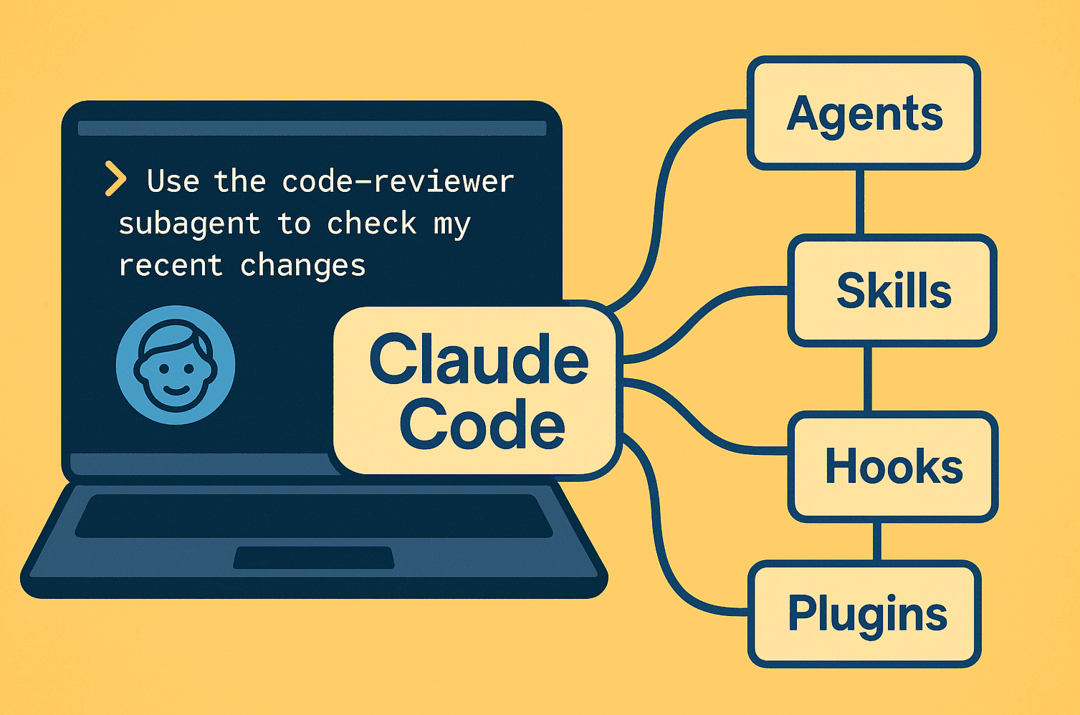
A short story: from one engineer's poke to a team of helpers
Imagine Maya, a senior backend engineer on a 25-dev team. She pushes a change and — instead of manually starting a dozen checks — types:
Claude Code delegates the task to a purpose-built code-reviewer subagent that has a separate context window, the right model, and only the tools it needs (Read, Grep, Bash). It runs static checks, points out a potential security issue in an auth flow, runs unit tests via a hook, and drafts the PR description — all without polluting the main conversation or requiring Maya to switch tools. That one saved hour becomes many when scaled across a team.
What Claude Code actually provides (high level)
🤖 Subagents / Agents
Modular AI personalities configured for specific tasks (code review, testing, planner). Each has its own system prompt, tool access, and isolated context so outputs don't pollute the main thread.
🛠️ Skills
Packaged, discoverable capabilities (folders with a SKILL.md, scripts, templates). Skills are model-driven and Claude decides when to use them based on request + skill description.
🎣 Hooks
Deterministic shell commands run at lifecycle events (init, pre-commit, session end, etc.). Use hooks when you must run something (e.g., run tests, set up env) rather than relying on the model to choose to run it.
🔌 Plugins & SDK
Extend with plugins (agents, tools, hooks, MCP integrations) or use the SDK to embed Claude Code in other workflows and scripts.
🔐 MCP & Tools
Integrate Model Context Protocol servers / external tools, and control which agents/skills can access which tools (principle of least privilege).
Why this matters for developers & leaders
Separation of concerns
The main conversation stays high level while subagents handle domain tasks with their own context windows. Easier audits, fewer hallucinations from context bleed.
Permissioned tool use
Lock down dangerous actions to narrowly scoped agents (e.g., a deploy agent that has Bash + Grep but not Secrets), improving safety and governance.
Reusability & team standards
Encapsulate best practices into Skills/subagents and share them across teams, reducing onboarding time and variance in quality.
Determinism via Hooks
For compliance, CI, and reproducibility, hooks guarantee actions run at specific lifecycle points instead of hoping the LLM triggers them.
Real-world example use cases
👥 Automated PR triage + code review (dev teams)
A code-reviewer subagent runs static checks, flags insecure patterns, suggests improvements, and drafts PR descriptions. A hook runs unit tests and posts results back to PR.
🚀 Release engineering / changelog automation (SRE & Release Managers)
A release skill parses merged PRs, generates structured CHANGELOG.md and release notes, and a hook triggers packaging + tagging pipelines.
📊 On-demand data investigator (Data & Analytics)
A data-scientist subagent can read CSVs or run short SQL via an MCP tool, summarize anomalies, and generate plots/templates.
🔐 Security hunting & infra posture (SecOps)
A privileged security-audit subagent scans IaC files, looks for misconfigurations, and suggests remediations. Hooks can require approval before infra changes are applied.
🛠️ Internal developer tools & batch jobs (platform teams)
Teams ship plugins & skills (via a marketplace) that employees install; e.g., a db-migrate skill with safe rollback scripts.
Walkthrough — practical snippets
1) Create a simple code-reviewer subagent
---
name: code-reviewer
description: Expert code review specialist. Proactively reviews code for quality, security, and maintainability. Use immediately after writing or modifying code.
tools: Read, Grep, Glob, Bash
model: inherit
---
You are a senior code reviewer. Prioritize security, readability, and maintainability. When possible, provide minimal reproducible suggestions and suggested diffs.
2) Skill skeleton
skills/format-changelog/
├─ SKILL.md
├─ templates/
│  └─ changelog_template.md
└─ scripts/
   └─ generate_changelog.sh
3) Simple Hook to run tests on session end
#!/usr/bin/env bash
# Hook: run tests at end of session
cd "$CLAUDE_PROJECT_ROOT" || exit 1
./gradlew test || {
  echo "Tests failed — blocking session end"
  exit 1
}
echo "Tests passed"
exit 0
Best practices & governance
🔐 Least privilege for tools
Grant only needed tools to a subagent.
📁 Project-level configs for teams
Store team agents in .claude/agents/.
🎣 Use hooks for required determinism
Right place for mandatory CI checks.
📈 Iterate on Skills
Start small, measure impact, publish internally.
Measuring impact — KPIs
Cycle time reduction
PR → merge
Automated checks
Catching issues pre-merge
MTTR improvements
Agent-assisted triage
Onboarding time
Reduction with shared Skills
Security exceptions
Prevented via hooks/permissions
Pitfalls & what to watch for
⚠️ Over-automation without guardrails
Avoid agents that can deploy without approval.
🔀 Context fragmentation
Design how findings surface back to the main thread.
📚 Skill sprawl
Maintain a registry and lifecycle; deprecate low-value skills.
A suggested rollout plan for teams (30/60/90)
📅 30 days: Pilot
Create a code-reviewer subagent + a session-end hook to run unit tests.
📅 60 days: Scale
Package 2–3 Skills (release notes, changelog generation, basic data report templates).
📅 90 days: Integrate
Integrate with CI, add an MCP tool for read-only DB queries, and create governance docs for permissions.
Final thoughts — why this matters now
Claude Code moves beyond single-turn prompts to composable, permissioned automations that live where engineers already work — the terminal and repo. For developers it's about speed and fewer repetitive tasks; for CTOs and platform leaders it's about standardisation, safety, and scaling expertise. Start small, lock down tool access, and iterate on Skills and agents that produce measurable developer productivity gains.
Share this article


Recent Posts

The Agentic Shift: Moving from Chatbots to Digital Coworkers
By 2026, enterprises are moving from AI chatbots that answer questions to digital coworkers that own outcomes across end-to-end workflows.

The Future of Agentic AI in Enterprise Applications
Why the next 3–6 months will define enterprise AI leadership — and how product and technology leaders can prepare for agentic systems that plan, decide, orchestrate, and execute.

Integration Modernization: An Enterprise Strategy for the Connected Enterprise
A Strategic framework for CIOs, CTOs, and enterprise architects to modernize integration, reduce risk, and unlock connected enterprise velocity.

Navigating the Future of AI Agents: MCP vs. A2A vs. ACP vs. ANP
A practical breakdown of the 4 key protocols shaping interoperable AI agents—what they do, where they fit, and how to choose (MCP, A2A, ACP, ANP).

AI 101: Your Gateway to the World of Large Language Models
A practical, non-fluffy guide to AI and Large Language Models (LLMs) for developers, CXOs, and AI leaders—what they are, how they work, when to use which model, and how to get reliable answers.

Google Maps for Your Code: Rescuing Architecture with the C4 Model
How the C4 model turns messy architecture diagrams into a clear, zoomable map of your systems—so teams can align, migrate, and evolve faster.

The Iceberg Beneath Your Code: Understanding Tech Debt in Software Development
Tech debt is the hidden iceberg beneath your codebase—slowing teams, inflating risk, and threatening outages. Here’s how to see it clearly and pay it down strategically.